
How can a tailoring app help boutique owners track monthly sales targets and improve Average Order Value (AOV) using real-time data instead of manual diaries and WhatsApp records?
A tailoring app helps boutique owners track monthly sales targets and Average Order Value (AOV) by providing real-time data dashboards that replace manual diaries and fragmented WhatsApp messages. By using a dedicated tailoring application, businesses can set specific revenue goals, monitor daily progress, and compare their performance against local market benchmarks to ensure consistent growth.
The Role of Real-Time Dashboards in Business Clarity
In a traditional boutique setup, understanding the health of the business often requires hours of manual calculation at the end of the month. GrowStitch changes this by introducing actionable dashboards designed for daily decision-making. Instead of static accounting reports, these dashboards provide a live view of the shop floor and the cash register.
For a boutique owner and chain of Boutique, clarity means knowing exactly where every order stands and which payments are pending. The dashboard serves as the central hub where you can view:
- Current Month Sales: Total revenue generated in the active month.
- Target Achievement: A visual representation of how close the store is to its monthly goal.
- Daily Activity: Orders pending today and deliveries at risk.
This level of visibility ensures that the owner is not running the business based on assumptions but on actual data. By moving away from "generic billing apps," tailoring software built for specific workflows captures the nuances of made-to-measure fashion, such as fabric instructions and trial dates, which are often lost in standard systems.
Setting and Tracking Monthly Sales Targets

Setting a "store target" is the foundational step in the GrowStitch platform. Without a defined target, growth is often uncoordinated. The application allows admins and store managers to input specific financial goals, which then populate throughout the business insight modules.
Why Tracking Targets Matters
Most boutique owners know their total sales but lack the context of whether those sales meet their growth requirements. Tracking targets provides:
- Strategic Focus: It helps the team prioritize high-value orders when the month-end is near.
- Staff Accountability: Managers can see if the team is performing at the required pace.
- Performance Comparisons: Users can view sales data for various periods, including today, yesterday, the last 7 days, or the previous month, to identify trends.
The software standardizes the order creation process, ensuring that every sale is captured accurately against these targets. This reduces the dependency on a single key person to remember sales figures or check physical bill books.
Understanding and Increasing Your Average Order Value (AOV)
Average Order Value (AOV) is a critical metric that measures the average amount a customer spends per transaction. In the GrowStitch demo, for example, the AOV is highlighted at ₹1,500. Monitoring this number is essential because increasing AOV is often more cost-effective than acquiring new customers. With built-in market intelligence, boutique owners can also benchmark their AOV against competing businesses operating in the same area, helping them adjust pricing, offers, and positioning with real market awareness..
How Tailoring Software Helps Increase AOV
The application facilitates higher order values through structured features:
- Add-ons and Cross-selling: During order creation, staff can easily add charges for items like cotton lining, padding, embroidery, or designer buttons.
- Service Catalog: A well-organized catalog for women, men, and kids allows staff to suggest related products, such as adding a "plazo" to a kurta order.
- Express Delivery Charges: For customers needing urgent stitching, the app allows for the inclusion of premium delivery fees, directly boosting the transaction value.
By analyzing AOV across different periods, owners can determine if their marketing efforts or design suggestions are effectively encouraging customers to spend more.
Benchmarking Performance Against Local Market Competition
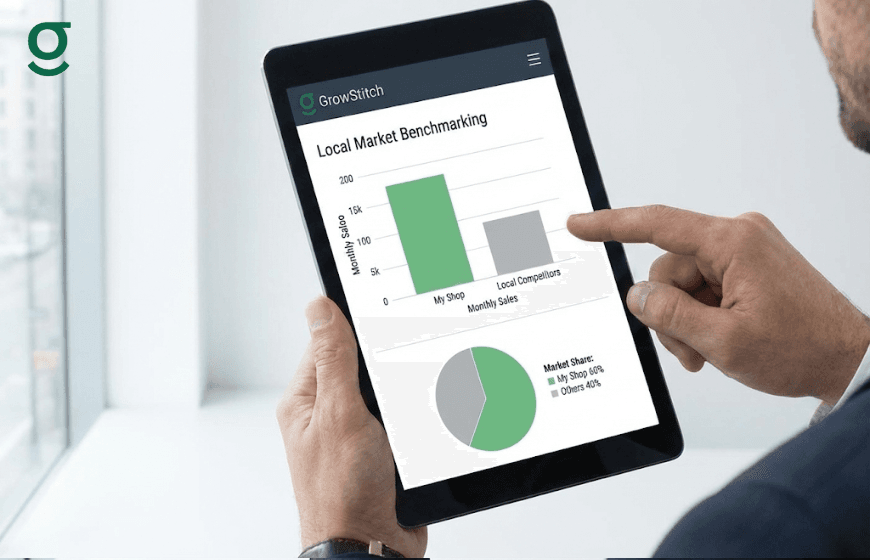
One of the unique differentiators of GrowStitch is the "Growth Insight" layer. Most owners only see their internal numbers, but this feature provides a "market-aware" perspective. It allows a boutique to see how it ranks against others in the same city or even the same pin code.
| Comparison Level | What You Can See |
|---|---|
| Market Rank | Your position in the city based on sales and order volume. |
| Top Products | The three best-selling products in your specific pin code. |
| AOV Comparison | How your average order value compares to the category average. |
| Growth Trends | Whether your business is growing faster or slower than the local market. |
Knowing your real position in the market prevents "growing blindly". If the market average for a bridal lehenga is higher than your AOV, it indicates an opportunity to adjust pricing or improve service quality.
Analyzing Geographic Performance: Domestic vs. Overseas Trends
For many Indian boutiques, overseas customers represent a high growth segment, yet their performance is often lumped in with local walk-ins. GrowStitch provides clear "Business Insights" to separate these two categories.
Owners can track:
- India vs. International Orders: The volume of orders coming from domestic versus overseas clients.
- Revenue Split: Which geography is contributing more to the bottom line.
- AOV by Geography: Often, overseas orders have a significantly higher AOV due to the complexity of the outfits and shipping considerations.
This geographic clarity allows owners to make data-backed growth decisions, such as whether to invest more in international marketing or focus on local bridal wear.
Conclusion
Transitioning to a dedicated tailoring app like GrowStitch allows boutique owners to move beyond manual management and gain true business intelligence. By setting monthly targets, monitoring AOV, and benchmarking against the local market, you can transform your tailoring unit into a structured, growth-oriented enterprise. With mobile-first design and multi-language support, the platform ensures that both the owner and the shop floor staff can work in harmony to meet the business's financial goals.
Early-bird advantage: the first 1,000 users unlock exclusive early access, download the app now and take control of your growth.
Frequently Asked Questions.
1. Is GrowStitch suitable for a small boutique just starting out?
Yes, it is designed to start simple and scale as the business grows. You can begin by tracking basic orders and later add advanced intelligence features.
2. Can to track the progress of an order through different tailoring stages?
Absolutely. The "Production Insight" feature allows you to track orders through customizable stages such as cutting, stitching, hemming, and finishing.
3. How does the app handle payments and pending balances?
GrowStitch provides real-time payment clarity by tracking paid, pending, and partial payments. It can even send payment receipt messages and balance reminders via WhatsApp.
4. Can my staff use the app in their local language?
Yes, the application currently supports Hindi, Telugu, and Urdu, with plans to add more languages like Tamil, Kannada, and Marathi.
5. How do I know if my boutique is performing well compared to others in my city?
The "Growth Insight" feature shows your market rank within your pin code and city, comparing your sales and order volume against similar boutiques.
6. Does the app help in calculating profit and loss?
The "Manage Expenses" feature allows you to track extra costs like outsourced embroidery or express delivery, which helps in calculating the overall profit and loss for the business.