
A tailoring app helps boutique owners identify recurring business patterns by consolidating order dates, production timelines, and sales data into visual reports. By using a tailoring application, fashion businesses can move away from manual record-keeping to see exactly when peak activity occurs, allowing for better staff management and inventory planning throughout the month.
Spotting Peak Activity Periods: Identifying Your Busiest Days and Weeks
For most boutique owners in India, business doesn't flow at a constant rate; it fluctuates based on the day of the week and the time of the month. Without digital tracking, these patterns remain as "gut feelings" rather than facts. Using the "Business Insight" feature in a tailor app allows you to filter sales and order volume by specific timeframes today, yesterday, the last 7 days, or the current month.
By analyzing weekly data, owners often discover specific peaks, such as a surge in walk-in orders on weekends or a high volume of delivery deadlines on Fridays. Identifying these peak activity periods ensures that the store is never understaffed during rush hours and that the master tailor is not overwhelmed by last-minute finishing tasks.

Monthly Revenue Forecasting: Using Historical Data to Predict Sales
Predicting future income is essential for managing overheads like rent and salaries. GrowStitch enables monthly revenue forecasting by allowing owners to set a "Store Target" and compare it against historical performance. When you can see your sales data from the "Last Month" alongside current progress, you can predict where the business will land by the 30th.
Historical data helps you answer critical questions:
- How much revenue do we typically generate in the first ten days of the month?
- What is our Average Order Value (AOV) trend compared to previous months?
- Is our growth target realistic based on last year's performance?
This data-driven approach removes the anxiety of "slow months" by providing a roadmap for when to push for more orders or when to focus on collection.
Product Trend Analysis: Determining High-Demand Styles Each Month
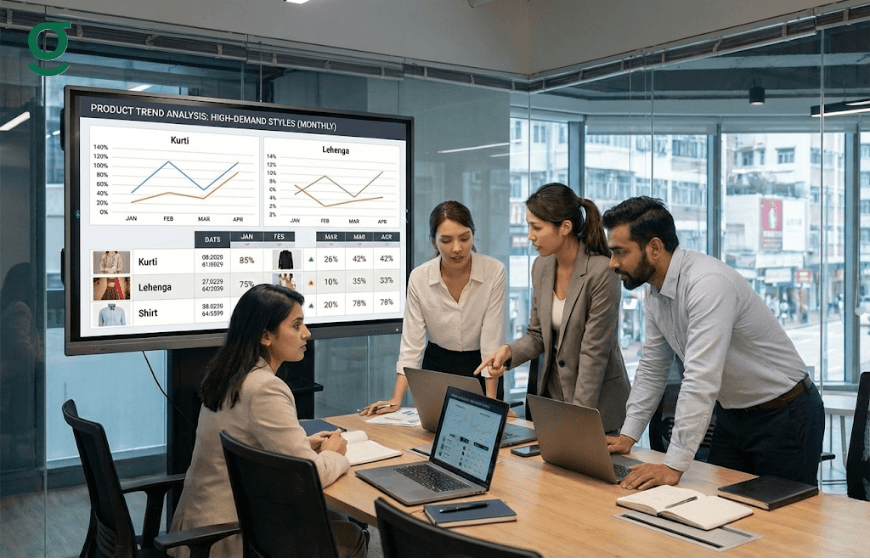
Consumer preferences in fashion change rapidly. A tailoring app provides "Growth Insights" that identify not just your sales, but which specific products are driving that revenue. In the Indian market, this might mean a shift from heavy bridal lehengas in January to light cotton kurtas in March.
By reviewing monthly product trends, owners can:
- Optimize Fabric Procurement: Buy more of what is actually selling.
- Update Display Mannequins: Feature the top three selling products identified in the app's rank list.
- Train Staff: Ensure the team is skilled in the most high-demand stitching styles for the upcoming season.
Analyzing Production Cycles: Tracking Workflow Efficiency from Week to Week

The "Production Insight" module is the heartbeat of a tailoring unit. It tracks an order as it moves through stages like cutting, stitching, hemming, and finishing. By monitoring these cycles weekly, owners can identify where bottlenecks occur.
If the data shows that orders are consistently stuck in the "finishing" stage every second week of the month, it may indicate a need for more specialized workers or better quality control processes. Tracking these patterns allows for a "Start simple. Scale smart" approach, where improvements are made based on actual production delays rather than guesswork.
Seasonal Growth Mapping: Aligning Your Business Patterns with the Indian Festive Calendar
The Indian fashion industry is deeply tied to the festive and wedding calendar. A tailoring application helps map your business growth against these seasonal cycles. Whether it is the lead-up to Diwali, Eid, or the winter wedding season, the app records the spike in order volume and overseas shipments.
| Festive Period | Business Pattern to Track | App Feature to Use |
|---|---|---|
| Wedding Season | Increase in AOV and bridal wear | Business Insight / AOV Tracking |
| Festive Rush | High volume of simple alterations/blouses | Production Insight / Stages |
| Post-Season | Customer retention and feedback | Contacts & Notifications |
Aligning your patterns with the festive calendar ensures that your tailoring unit is prepared for the "India vs. Overseas" order split, as international clients often place orders months in advance to account for shipping times.
Conclusion
Understanding business patterns is what separates a busy boutique from a profitable brand. With a tailoring app like GrowStitch, owners can track real numbers, predict cash flow, streamline production timelines, and outpace nearby competitors. Shifting from handwritten records to a digital system turns guesswork into strategy and daily work into measurable progress.
Early-bird advantage: the first 1,000 users unlock exclusive early access download the app now and take control of your growth.
Frequently Asked Questions
1. How does a tailor app help in tracking my daily sales?
The app features a real-time dashboard that displays "Today's Sales" and "Orders Created," giving you an instant snapshot of your daily performance without manual calculations.
2. Can I see which tailors are the most efficient?
Yes, through the Production Insight feature, you can assign production stages to specific team members and track how quickly orders move through their assigned tasks.
3. Does the app notify me when I am falling behind my monthly target?
The dashboard provides a visual representation of your "Set Store Target" versus actual sales, allowing you to see at a glance if you need to increase your order intake to meet your goals.
4. Can I track orders from international clients separately?
Yes, GrowStitch provides insights into geographic performance, helping you identify patterns in domestic versus overseas orders and their respective order values.
5. How does the app help with customer birthdays and anniversaries?
The "Contacts" section allows you to save birthdays and anniversaries. The app provides notification pop-ups, enabling you to send personalized wishes or offers via WhatsApp to drive repeat business.
6. Is it possible to customize the production stages for my specific workflow?
Absolutely. During onboarding, users can customize, skip, or assign production stages like stitching, hemming, or embroidery to fit their unique boutique workflow.